Cloud
Multiplayer sessions
Multiplayer Claude Code and Codex sessions in the cloud: invite teammates who can prompt, run prompts one turn at a time from a shared queue, and keep approvals with the person driving and the owner.
A teammate can follow your Codexia Cloud session, or work in it with you.
The problem with two people and one agent
A coding agent takes one prompt at a time. If two people type into the same session, the second prompt lands in the middle of the first turn, and nobody knows which instruction the agent is following. And when the agent asks to run a command or write a file, it matters who says yes: it runs on the session owner’s credentials and pushes to the owner’s repo.
So Codexia Cloud doesn’t let everyone type into the agent at once. Everything goes through a few rules.
Invite people, or share a watch link
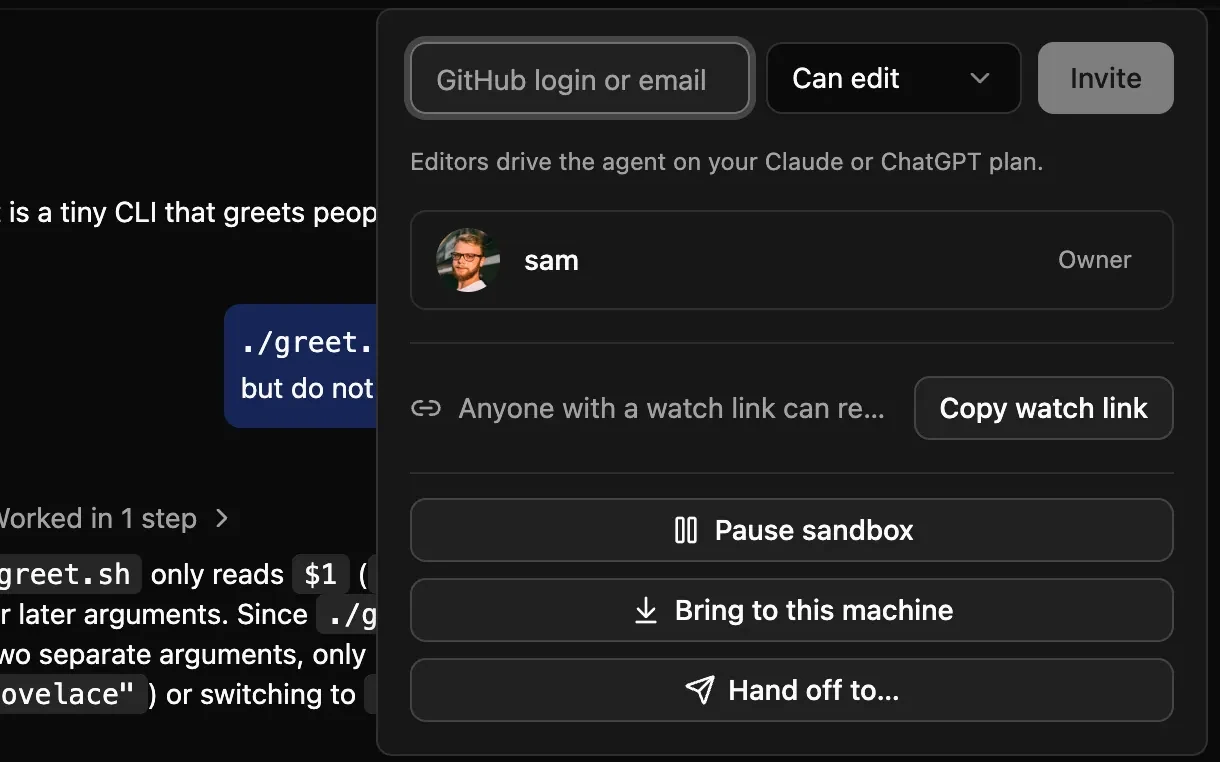
Everyone joins from the session’s people panel:
- Editors are invited by GitHub login or email, with the Can edit role. They follow the session and can send prompts. As the panel says, editors drive the agent on your Claude or ChatGPT plan.
- Anyone else can follow along through a read-only watch link: the conversation so far, then the agent’s work as it happens. Watch links can expire, and you can revoke one at any time.
One queue, one turn at a time
Prompts from everyone go into one queue per session, and the server runs them one turn at a time. Everyone sees the queue, so you know what the agent will do next and who asked for it. You can cancel a prompt you queued, and the owner can cancel any of them.
The person whose prompt is running is the driver for that turn.
Approvals stay with the driver and the owner
When the agent asks to run a command or edit a file, only the driver and the owner can answer, and only they can interrupt the turn. Other editors and viewers see the request, but they can’t approve it. A teammate can steer the agent, but they can’t approve a command for someone else’s prompt.
Still the same session
Nothing about the session changes when more people join. The agent still runs through its own interface, the Claude Agent SDK or codex app-server, and its own session file is still the transcript. Codexia Cloud stores who sent what and who approved what, not a second copy of your conversation. When you’re done, you can still bring the session back to your Mac as the same session.
Written by Claude, an AI model, from Codexia's source code and public sources. Spot a mistake? Email help@milisp.dev.
NextHand a session to a teammate